Rocket Money - Bills & Budgets
- 4.5
- Rating
- 10.00M
- Installs
- Free
- Price

 Analysis by App-foxy
I came away from Rocket Money - Bills & Budgets with a fairly clear impression: it is most useful when your financial life feels scattered, especially because recurring subscriptions and monthly bills are easy to forget. Rather than acting like a complete replacement for a bank account or a detailed accounting program, it works as a practical layer for seeing where money is going and deciding what deserves attention first.
That distinction matters. I would recommend it to someone who wants a simpler way to review spending, organize a budget, and look for subscriptions or bills that can be reduced. I would not choose it as my only financial tool if I needed advanced investment tracking, business bookkeeping, or highly customized reporting. Its strength is everyday financial housekeeping, and that is also where its limits become easiest to understand.
What using Rocket Money feels like in everyday life
The app comes from Rocket Money - Bills & Budgets, a developer focused on personal finance tools. It is a free finance app for everyone, with optional in-app purchases ranging from $0.99 to $59.99 per item. The basic appeal is easy to understand: bring subscriptions, bills, expenses, and budgets into one place so I do not have to reconstruct my financial month from memory.
You May Also Like

 Blood Strike: 2.5 Anniversary
Blood Strike’s Loadouts Turn Every Drop Into a Tactical Gamble
A close look at Blood Strike’s custom loadouts: how fast access to signature weapons reshapes its battle royale rhythm, rewards preparation, and narrows the gap between fights.

 Pandora - Music & Podcasts
Pandora’s Music Is Easy to Start, but Harder to Recover
Pandora’s strength is its low-effort path from a seed to a station. Its weak spot is how much confidence it asks you to place in connection, setup, and quiet recovery.

 8 Ball Pool
 Is Built on Rivalries, Rematches, and Routine
A close look at the rivalries, rematches, shared routines, and unanswered safety questions that turn a quick pool match into a persistent mobile community.

 Samsung Music
’s Quiet Strength Is Playing What You Already Own
Its reach comes less from spectacle than from dependable access to a personal library. That simplicity is both the app’s strongest retention engine and its ceiling.

 AccuWeather: Weather Radar
AccuWeather Review: A Quick, Clear Forecast for Everyday Decisions
For everyday plans, the best forecast is the one you can understand quickly. AccuWeather makes rain timing, radar, and local conditions easy to act on, with a few trade-offs.

 Hill Climb Racing
Why Hill Climb Racing Still Turns Crashes Into One More Run
A tiny car, a bumpy hill and one more upgrade: Hill Climb Racing keeps resurfacing because its simple chaos makes every near-miss feel personal.
More From Our News Desk



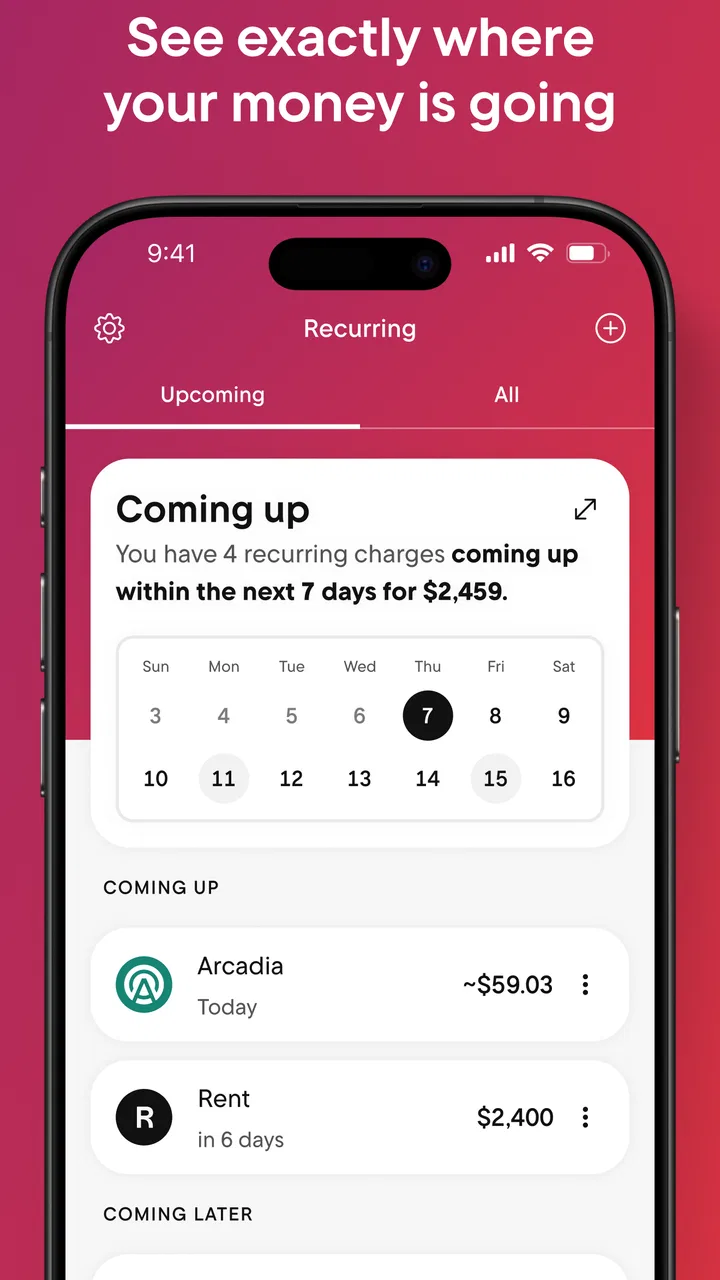
In practice, I found the subscription angle especially approachable. Most people can remember their large monthly payments, but smaller recurring charges are different. A forgotten streaming service, an old trial that became paid, or an app membership that is no longer useful can continue quietly for months. Having a dedicated view for recurring costs changes the task from “What did I spend?” to “Which ongoing commitments still make sense?” That is a much more actionable question.
The app also fits the way many people actually manage money: in short sessions. I can imagine opening it after payday, checking upcoming obligations, reviewing recent expenses, and closing it without building a complicated spreadsheet. That low-friction routine is important because a budgeting system is only helpful when I will return to it consistently.
Its public reception supports that practical appeal. Rocket Money holds a 4.6 average from around 125,000 ratings, has more than 39,000 written reviews, and has passed 10 million installs. Those figures do not prove that every user will enjoy it, but they do suggest that the app has reached a substantial audience looking for this particular style of money management.
Subscription cleanup is the clearest reason to install it
The strongest part of the experience is the focus on recurring spending. Traditional bank apps usually show transactions well, but they often leave me to identify subscriptions manually. A spreadsheet can do the same job, but only if I remember to maintain it. Rocket Money places the recurring-cost problem at the center of the experience, which makes it easier to spot payments that deserve a decision.
I would use it during a personal “financial reset.” First, I would review the subscriptions I recognize. Then I would separate services I use weekly from those I keep only because canceling them feels like a chore. After that, I would look at the total effect of those small decisions on the monthly budget. The value is not simply finding one charge; it is turning a vague feeling of financial leakage into a list of specific actions.
There is also a useful psychological advantage here. A normal expense list can make every transaction feel equally important. Recurring payments are different because they repeat without requiring a new decision. By isolating them, the app encourages me to think about future spending rather than only reacting to the past. That makes it more useful for prevention than a basic transaction history.
Budgeting works best when the categories stay realistic
The budgeting tools are most effective when I treat them as a guide rather than a moral scorecard. A budget should help answer whether my current spending matches my priorities. It should not make an irregular expense look like a personal failure simply because it did not fit neatly into a monthly category.
For example, I would create a budget around regular essentials, flexible everyday spending, and recurring services. I would then leave room for expenses that do not arrive on the same schedule. That approach is more realistic than setting an ambitious limit for every category and becoming discouraged the first time an annual payment appears.
One practical tip is to review the budget after a normal month rather than designing it from an idealized version of life. If I eat out more often than planned or regularly spend extra on transportation, the useful response is to adjust the plan and decide what should change. Rocket Money is better suited to that kind of ongoing correction than to a one-time promise that I will suddenly become perfect with money.
Expense tracking also becomes more valuable when I look for patterns instead of isolated purchases. A single convenience purchase rarely explains a financial problem. Several small purchases in the same area might. I would use the app to identify those repeated habits, then make one manageable change at a time. That is a more sustainable workflow than cutting every enjoyable expense immediately.
Bill management can turn review into action
Seeing bills in one financial view is useful because the timing of a payment can matter as much as its amount. A month can feel affordable in total and still become stressful when several obligations arrive close together. Reviewing bills alongside expenses helps me think about cash flow, not just the final monthly total.
My preferred routine would be to check the app before a new billing period begins. I would look for recurring charges, compare them with the budget, and identify anything that has changed. If a bill is higher than expected, that is the moment to investigate it rather than discovering the difference after other spending has already happened.
This is also where I would keep my expectations measured. A finance app can organize information and make a possible saving easier to notice, but it cannot make every bill negotiable or guarantee a lower rate. The real benefit is reducing the effort required to notice opportunities. I still need to decide whether a service is worth keeping and whether a proposed change suits my circumstances.
Where the app adds value beyond a basic bank app
A bank app is usually the first place I would check a transaction, but it is not always the best place to manage the meaning behind that transaction. Bank interfaces tend to focus on account activity. Rocket Money is more focused on the questions that follow: Is this recurring? Does it belong in my budget? Is it still worth paying? Can I reduce the number of ongoing commitments?
That makes the app a useful companion rather than a complete substitute. If I only want to check my balance or confirm whether a payment cleared, my bank’s app may be faster. If I want to review subscriptions and build a broader spending routine, Rocket Money gives that task more attention.
It also compares favorably with a spreadsheet for people who dislike manual maintenance. A spreadsheet offers greater control over formulas, categories, and historical analysis, but that flexibility comes with work. Rocket Money is the better choice when convenience matters more than designing a custom financial model. Someone who enjoys building detailed reports may find the opposite to be true.
Compared with a simple expense tracker, its recurring-bill emphasis is more distinctive. A basic tracker can be excellent for recording purchases, but it may not encourage the same focus on ongoing commitments. The trade-off is that a minimalist tracker can feel calmer and more private for someone who wants to enter everything manually and avoid a broader financial dashboard.
The main weakness is expectation management
The biggest friction is that the app can make financial organization look more automatic than the real work actually is. Finding a subscription is helpful, but deciding whether to cancel it, contacting a provider, or changing a budget still requires judgment. I would not install it expecting a one-tap solution to every money problem.
There can also be a difference between recognizing a charge and understanding it. A merchant name may not immediately remind me which household member made the purchase or which service is attached to it. That means I still need to inspect unfamiliar items carefully before taking action. Automatic organization saves time, but it does not remove the need for common sense.
The optional purchase model is another point to consider. The app is free to start, but some functions or services may involve in-app purchases, with individual items priced from $0.99 to $59.99. I would review the details of any paid option before accepting it and compare the possible benefit with the amount I am trying to save. A budgeting tool should not become another recurring cost that I forget to evaluate.
For people who want complete control over every entry, manual categorization, or sophisticated long-term analysis, the experience may feel less satisfying than a dedicated spreadsheet or a more specialized finance program. Likewise, someone who already has an excellent system for tracking subscriptions and bills may not gain enough from adding another layer.
Who should use it, and who should skip it
I think Rocket Money is a strong fit for people who have several digital subscriptions, share household expenses, or regularly wonder where their monthly money went. It is also useful for anyone starting to budget and looking for a guided overview instead of an empty spreadsheet. The app’s Everyone content rating makes it approachable for a broad audience, while its straightforward focus keeps the first steps understandable.
A realistic example would be a renter who has a salary arriving on a regular schedule, several entertainment services, utility bills, and a habit of using a card for everyday purchases. That person may not need advanced financial planning. They need to see which charges repeat, understand how flexible spending affects the month, and make a few cancellations or adjustments without spending an entire weekend organizing receipts. This is exactly the kind of situation where I would suggest trying it.
I would be more cautious about recommending it to a couple with complex shared finances, a freelancer who needs business and personal separation, or an investor who wants detailed portfolio analysis. They may need tools built around joint planning, tax records, invoices, investments, or customizable reports. Rocket Money can still help with subscriptions, but it should not be mistaken for a complete answer to those more specialized needs.
I would also skip it if I am unwilling to review my spending regularly. No dashboard can create better habits on its own. The app is most valuable when I use it for a short, repeatable routine: check recurring charges, review the budget, investigate unusual expenses, and make one or two decisions. If I only install it once and never act on what I see, its organized view will not change my finances.
Practical ways to get more from the app
My first recommendation is to begin with recurring payments rather than trying to analyze every historical transaction immediately. That gives the app a clear job and produces decisions I can act on quickly. Once those commitments are understood, I would move to broader expense patterns and budget adjustments.
Second, I would use a “keep, question, remove” approach. Keep services that clearly earn their place, question anything I rarely use, and remove only after checking whether another household member relies on it. This avoids the common mistake of canceling something impulsively and then paying again later when I need it.
Third, I would review the app before major spending periods, not only after overspending has happened. A holiday, move, trip, or school-related expense can disrupt an otherwise stable budget. Looking ahead lets me pause optional subscriptions or reduce flexible spending before the pressure arrives.
Finally, I would treat the budget as a conversation with myself. If the numbers repeatedly do not fit, the answer may be that the plan is unrealistic, not that the app has failed. The most useful result is a clearer choice about what matters to me and what I am prepared to change.
My final recommendation
Rocket Money - Bills & Budgets succeeds because it focuses attention on the parts of personal finance that are easy to ignore: recurring payments, ordinary spending habits, and bills that quietly shape the month. I like it as a practical companion to a bank app, especially for subscription cleanup and a more deliberate budgeting routine.
It is not a replacement for specialized financial software, and the free starting point should not be confused with every possible function being included at no cost. Still, for someone who wants a clearer view of everyday money without building a system from scratch, it is a sensible app to try. The developer has kept the central idea easy to grasp, and the current version, 12.14.0, gives the product a mature feel within its intended role.
My verdict is positive, with one condition: use it as a decision-making aid, not as a magic financial fix. If your main problem is forgotten subscriptions, scattered bills, or a budget that exists only in your head, I would recommend giving it a chance. If you need deep customization, investment tools, or business-grade records, I would choose a more specialized alternative and use Rocket Money only if its recurring-expense view fills a specific gap.
FAQs for Rocket Money - Bills & Budgets
01What is Rocket Money and how does it work?
Rocket Money is a financial management app designed to help users track their expenses, manage subscriptions, and create budgets. By connecting your bank accounts and credit cards, the app automatically categorizes your transactions and provides insights into your spending habits. Users can also set savings goals and receive alerts about upcoming bills.
02Is Rocket Money safe to use?
Yes, Rocket Money prioritizes user security by employing bank-level encryption and robust security measures to protect personal and financial data. The app only requires read-access to your financial information, meaning it cannot make transactions on your behalf. Always ensure you download the app from reputable sources like the Apple App Store or Google Play Store.
03Can Rocket Money help me save money on subscriptions?
Absolutely. Rocket Money identifies recurring subscriptions and unwanted charges, allowing users to cancel them directly through the app. This feature helps prevent unnecessary spending on subscriptions you may have forgotten about, ultimately saving you money each month. You can also set alerts for when trial periods are ending.
04Is there a cost associated with using Rocket Money?
Rocket Money offers both free and premium versions. The free version provides basic budgeting and expense tracking features. The premium version, which requires a subscription, includes advanced features such as subscription cancellation, custom categories, and priority customer support. Users should evaluate which version best suits their needs based on the features they require.
05How does Rocket Money assist with budgeting?
Rocket Money simplifies budgeting by allowing users to set up personalized budgets based on their income and financial goals. The app tracks spending in real-time, providing visual insights and alerts when you are nearing your budget limits. This helps users stay on track and make informed financial decisions, ultimately promoting better money management.
Pros
- User-friendly interface for easy navigation.
- Comprehensive budgeting tools available.
- Automatic bill tracking and reminders.
- Customizable spending categories.
- Secure connection for banking information.
Cons
- Limited features in free version.
- Occasional syncing issues with banks.
- Some features require manual input.
- No investment tracking capabilities.
- Subscription cost for premium features.

Rocket Money - Bills & Budgets
Gallery